






Deskless worker software: how to reach every employee in 2026
Claude Shannon, who founded information theory in 1948, proved something companies today sometimes forget: a message has no value until it reaches the receiver. Deskless worker software exists because most internal communication fails on exactly this point, and the people it fails most are those furthest from a desk. The gap is widening as AI arrives. BCG's 2025 AI at Work study found 75% of leaders use generative AI regularly against just 51% of frontline staff, a divide it calls the silicon ceiling.
This guide functions as a practical decision-making companion. It explains what deskless worker software is, the features that matter, how it differs from an intranet, what it costs, and how AI is reshaping it in 2026 , supporting the HR, IT, Operations and Communications leaders deciding how to reach the workforce head office has always struggled to hear.
 Dr. Franzi Finkenstein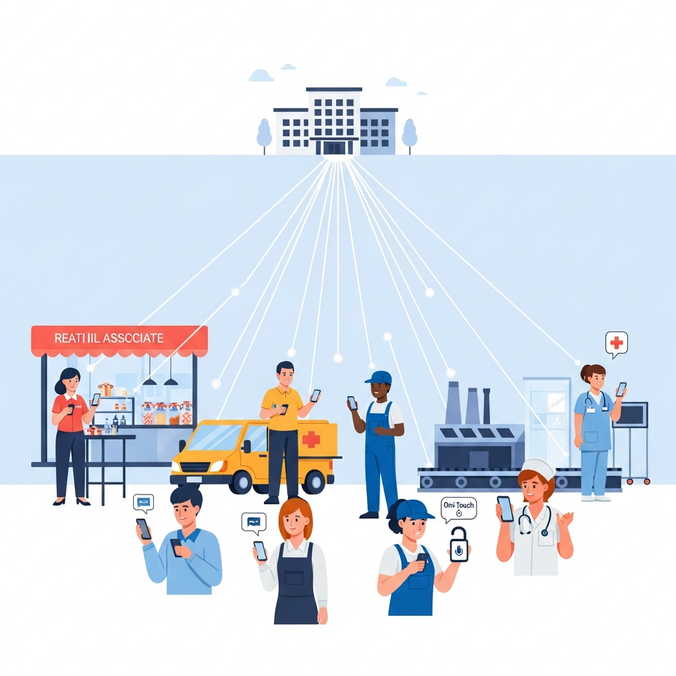
Key Takeaways
Deskless worker software is a category of mobile-first technology solutions built for the majority of the global workforce who work without a company laptop or fixed workstation, covering retail staff, delivery drivers, nurses, factory workers and construction workers.
Most engagement tools were designed for desk jobs, which is why so many deskless employees feel overlooked. A fresh and urgent version of that gap has appeared with AI: BCG found frontline GenAI use stuck at 51% while leaders sit at 75%.
The next phase of deskless worker technology is AI and digital identity. As frontline workers gain one-touch access to all the tools they need, the platform that carries that identity becomes business-critical infrastructure rather than a nice extra.
What is deskless worker software?
Deskless worker software is a category of mobile-first tools designed for employees who work without a company laptop or fixed workstation. It covers retail associates, logistics workers, nurses, production staff and anyone whose job happens on a shop floor, in a vehicle or out in the field. The software gives these workers a single communication platform on a mobile device for company news, shift information, HR tasks and team chat, often without a corporate email address ever being involved.
This guide is written for the HR, IT, Operations and Communications leaders who own that workforce, and it matters for a simple commercial reason. The market for mobile enterprise apps serving deskless workers is approaching US$180 billion, according to SHRM, so the question for most organizations is no longer whether to invest but how to choose well.
The scale of the audience is what makes this a market-defining term. Deskless and frontline workers form the larger share of the global workforce, yet office workers are the group almost all workplace technology was originally built for. Deskless worker software corrects that imbalance by treating the frontline workforce as the primary user rather than an afterthought.
The distinction matters in plain terms. A traditional office setting assumes a quiet desk, a screen and an inbox checked every few minutes, the same assumptions that serve office workers and remote workers well. A warehouse, a ward or a building site assumes none of those things. Software for deskless teams has to meet workers where they actually stand, on a personal device, in short bursts, sometimes offline.
Why do so many deskless employees feel forgotten, and why does employee engagement suffer when deskless workers feel unheard?
Most internal systems were never designed with operational employees in mind. The corporate intranet sits behind a login that assumes a desktop. The all-staff email lands in an inbox that many deskless employees do not have. Even the technology they do receive often disappoints: Emergence Capital found that 60% of deskless employees find the tools they are given unsatisfactory, slow, clunky and built for someone else. The result is a workforce that powers the business yet receives company information last, if at all, and frequently does not feel their job is seen as important to the company.
The cost of that gap is now well documented, and it is growing in real time. Gallup reports that 85% of employees worldwide are not engaged or actively disengaged at work, with only 21% genuinely engaged, and estimates that low engagement drains the global economy around US$8.9 trillion a year in lost productivity. The flip side is the opportunity: Gallup's meta-analysis shows highly engaged teams are about 18% more productive than disengaged ones, so companies with engaged deskless workers see measurable gains in operational efficiency.
Frontline roles carry the sharpest edge of this. In parts of retail and hospitality, annual turnover runs past 100%, fueled by unpredictable rosters that reach workers only days ahead and by the physical and mental strain of constant shift changes. The newer worry sits on top of all that. BCG's 2025 AI at Work study shows frontline GenAI adoption frozen at 51% against 75% for leaders, so the very group with the least access to direct communication now also has the least access to the tools redefining their industries.
The gap has a face — and a cost
Think of Marco, a shift lead at a regional grocery chain. He learns about a new returns policy from a customer waving a leaflet that head office posted online three days earlier. The information existed. It simply never reached him through a channel he could open between tasks. Now add an AI assistant that could have answered his question instantly, sitting behind a login he has never been given. Multiply Marco across thousands of stores and the lack of direct communication stops being a nuisance and starts shaping business performance.
This is the gap deskless worker software was built to close. When employees feel informed, trusted and heard, job satisfaction and work life balance improve, employee retention rises, and so does the quality of the work they do for customers.

Discover how Flip empowers different roles across your organization — from communications to HR to operations here.
What features does deskless workforce software need to give workers all the tools they need?
Strong deskless workforce software earns its place by removing friction for people who have no time to spare. Whether it is branded an employee communication app, an employee engagement app or a full employee experience app, judge the feature set against the texture of a real shift. The essentials:
A mobile-first communication platform that works on personal devices, so workers can read news and chat without a corporate laptop.
Login without a corporate email address , since most deskless workers never receive one.
Offline-capable access , so delivery drivers and field staff keep working through dead zones and data syncs once a signal returns.
Secure broadcasting and document management , so leaders can broadcast updates to the right site, role or region and manage HR documents such as payslips and policies in one place.
HR self-service , so absence requests and shift confirmations happen in a few taps rather than a queue outside an office.
Training and development opportunities delivered as bite-sized training materials inside the app, removing the need for classroom time most operations cannot spare.
Employee feedback and sentiment tools that let leaders measure employee engagement and act on what they find.
Automated workflows that replace manual processes such as paper forms and clipboard sign-offs.
The best of these mobile apps do more than tidy up communication. They hand employees all the tools they need to do their jobs well, which is the single clearest signal to a workforce that the company is paying attention. A strong employee experience for frontline staff starts exactly here.
How is deskless worker software different from a company intranet, and how does it help teams effectively communicate?
A classic intranet is a library. Deskless worker software is a workplace in your pocket. The difference is not academic for someone halfway through a twelve-hour shift.
A traditional intranet assumes a desktop browser, a stable connection and a worker who has minutes to search. A generic mobile app might solve the screen size yet still demands a corporate login and offers little beyond a feed. Purpose-built deskless workforce software assumes a personal phone, intermittent signal and a worker with thirty spare seconds.
| Capability | Classic intranet | Generic mobile app | Deskless worker software |
|---|---|---|---|
| Built for mobile device first | No | Partly | Yes |
| Works without corporate email | Rarely | Sometimes | Yes |
| Offline-capable | No | Rarely | Yes |
| HR self-service and workflows | Limited | Limited | Yes |
| Two-way employee feedback | Weak | Weak | Strong |
| Reaches frontline employees directly | Poorly | Variable | By design |
The practical test is simple. If a tool requires a desk, a browser tab and a work email to be useful, it was built for office workers and retrofitted for everyone else.
Which industries use deskless worker software across the deskless workforce?
The technology earns its keep wherever the work happens away from a screen. The pattern repeats across sectors with high frontline density:
Retail. Store associates receive promotions, planograms and policy changes in real time across hundreds of locations.
Logistics and transport. Delivery drivers confirm routes, log incidents and stay reachable while moving, with offline support for poor-signal stretches.
Manufacturing. Factory workers on the line in manufacturing plants get safety briefings, shift handovers and machine updates without leaving the floor.
Construction. Construction workers on dispersed construction sites access drawings, report hazards and clock activity from a single mobile app.
Healthcare and services. Operational teams in care, facilities and security stay connected to rotas and protocols between patients and patrols.
In each case the same truth holds. These employees rarely had a corporate email address or a desk, so a mobile-first platform is the only realistic way to reach them and to let them effectively communicate back.
How do you roll out a communication platform to deskless workers?
A successful rollout treats adoption as the goal, not installation. The most effective approach follows a clear sequence:
Start with communication. A communication platform makes a great starting point. It delivers value to every employee on day one and needs little proper training to use.
Bring in the major factors early. Involve Comms, HR, Operations and IT from the outset so the platform reflects how work actually flows.
Pilot in one region or site. Prove the model with a single group of deskless workers, gather employee feedback and refine before scaling.
Layer in workflows. Replace manual processes such as paper absence forms with automated workflows and HR self-service once communication habits are set.
Measure employee engagement. Track active usage, employee sentiment and task completion, then act on what the data shows.
Expand across the deskless workforce. Roll out site by site, using early adopters and younger workers as internal champions.
Done well, this turns a launch into a habit. Engaging deskless workers is far easier when the first thing they touch solves a problem they already feel.
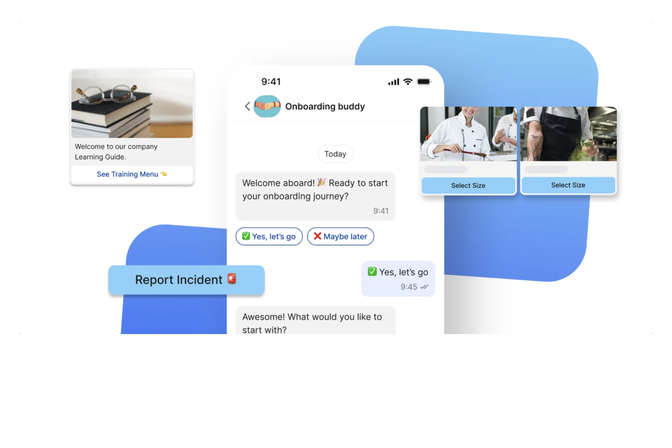
The intelligent agents of Flip Flows help your employees through each step of their journey.
What does deskless employee engagement software cost, and what is the return?
Pricing for deskless employee engagement platforms is almost always per user per month and varies with scale and depth. Lighter communication-only tools tend to start at a few euros per user each month, while full frontline platforms with workflows, integrations and identity sit higher. Enterprise agreements for large multi-site organizations are usually negotiated rather than listed.
The figure that matters more is the return. Frontline turnover often runs well above desk-based roles, sometimes past 100% a year, and replacing an operational employee carries real recruitment and training costs. Satisfied deskless workers are markedly less likely to quit, so when the software lifts employee satisfaction and employee retention even modestly, the saving usually dwarfs the license fee. Increased job satisfaction also feeds directly into customer loyalty and operational efficiency, the two outcomes decision makers care about most.
The business case is simple: the cost of the software is visible and small, while the cost of a disengaged deskless workforce is large and mostly hidden, the kind of broken channel Shannon warned about, where the message and the value never reach the people doing the work.
Deskless worker software comparison: what to look for
By this point the evaluation question sharpens. The market is crowded with employee apps, many built as desk tools with a mobile skin. A serious comparison weighs four things: how well the platform reaches workers without a corporate email, whether it functions offline, how deeply it handles HR and operational workflows, and how it treats identity and AI.
This is where Flip earns a close look. Flip is a frontline employee experience platform purpose-built for the deskless workforce, trusted by more than 500 organizations including REWE, Bosch and McDonald's . It begins with out-of-the-box communication that workers genuinely open, with reported monthly active engagement above 90%, then extends into HR self-service, automated workflows and AI through a single GDPR-compliant, mobile-first app. Flip empowers employees to act, propels real tasks forward and scales from a single site to a global workforce, a strong fit for small and large companies preparing for a future where AI carries more of the load.
How AI and identity are reshaping deskless worker technology in 2026
The frontier of deskless worker technology has moved from messaging to action. The newest platforms let a worker get things done through conversational and voice interfaces that complete tasks, retrieve data and trigger workflows on the worker's behalf.
Identity is the quiet revolution underneath this. Gartner's 2026 guidance on the identity fabric treats AI agents as first-class identities and frames identity as part of the operating fabric of the enterprise itself. For a workforce that sits largely off the corporate network, this becomes a frontline problem first. A single secure digital identity that opens every system with one touch removes the password friction that has always slowed deskless workers down. For the background on this shift, Flip's explainer on what identity fabric means for HR and IT leaders is a useful primer.
Picture a near-future case, illustrative rather than a real customer. A mid-sized logistics firm gives every driver one app. The driver logs in once with a single Flip identity , confirms tomorrow's route by voice, files an expense by photographing a receipt, and books annual leave between deliveries. No corporate email, no second login, no paper. The frontline workforce stops being the hardest group to reach and becomes the most connected. The platforms that own identity and AI for the frontline will define the next decade.
Conclusion: the channel decides who gets to keep up
Shannon's insight holds in any era: a message reaches its receiver, or it may as well never have been sent. For most of the digital age the frontline workforce sat at the wrong end of a broken channel, served last, reached poorly and handed tools built for someone else.
That era is ending, and the timing matters more than ever. Deskless worker software has turned the personal phone in a worker's pocket into a genuine workplace, and AI and digital identity are about to make it the place where real work gets done. The companies that act now will not merely improve internal communication . They will decide whether their frontline keeps pace with the AI shift or watches it from below the silicon ceiling. The channel was always there. The question was only ever whether anyone would open it to the people doing the work.
Sources: AI at Work 2025: Momentum Builds, but Gaps Remain, Boston Consulting Group; State of the Global Workplace, Gallup ; The Benefits of Employee Engagement, Gallup; Gartner Predicts 2026: Identity and Access Management.

Reach your operational teams 80% faster and more reliably
Flip's mobile app combines messaging, chat, HR tools , and your knowledge base in one secure application. No additional tools or licenses required.
FAQ - deskless worker software
It is the most practical route to doing so. The silicon ceiling exists largely for one reason: frontline workers have no shared digital surface where AI tools could even appear. A deskless platform gives them one, so an in-app assistant, knowledge search or guided workflow reaches a warehouse picker the same way it reaches a head-office analyst. Without that surface, frontline AI access stays theoretical.
Look past download numbers to weekly active use, the share of HR tasks completed in-app, feedback response rates and time-to-read on critical news. A healthy deployment shows the same employee returning across a fortnight, not a one-time install.
Ownership is shared, and the smoothest rollouts reflect that early. Internal Communications usually feels the pain first and opens the conversation, HR and Operations carry the budget and the workflow logic, and IT together with the works council validate data handling and access. Treating it as a single department's tool tends to stall adoption at the first site.
Expect scrutiny on where data sits, how personal and work data stay separate, and what the platform can and cannot see. A GDPR-compliant platform with clear role-based access answers most of it. Involving the works council during the pilot turns a potential blocker into an ally.
The strongest platforms are offline-capable, holding content without a signal and syncing actions once connectivity returns. This matters more now that AI features and live workflows are involved. A delivery driver in a dead zone still needs the last safety briefing and the ability to log an incident, and the platform should hold both until the signal comes back.

Dr. Franzi Finkenstein
Dr. Franzi Finkenstein is part of the Content & Search team at Flip, writing about digital communication, employee engagement and AI–human connections. Drawing on a humanities PhD and extensive editorial experience, she focuses on how digital technology is reshaping the future of work and explores how employee health and wellbeing in modern workplaces can be improved.
Don’t forget to share this content

More on the topic of Employee app

Employee app: 10 best tools for internal communication 2025
Biometric login: what the future of workplace access looks like

Digital Workplace: how AI is changing everything