






Best intranet software 2026: the top 12 providers compared
Published: · Updated:
How do you choose an intranet that works as well for the people on the shop floor as it does for those at a desk? It is the question more and more organizations are asking in 2026, as hybrid and frontline-heavy teams outgrow the tools built for office workers alone.
Modern intranet software has become essential for any business that wants to improve internal communications, lift employee engagement, and streamline everyday operations. The market, though, has grown crowded. Some platforms polish top-down comms, others chase social features or mobile access, and only a handful genuinely serve the frontline workers who make up the majority of many workforces while still supporting desk-based staff. This guide compares the 12 best intranet software platforms of 2026, with a clear recommendation for each use case.
 Dr. Nirmalarajah Asokan
Key Takeaways
The best intranet software in 2026 depends on your workforce. Flip AI leads for the large majority of organizations that run a mix of desk-based and frontline staff, while Microsoft SharePoint and Viva suit companies whose workforce sits almost entirely at a desk.
Most companies are neither fully desk-based nor fully deskless. They need an intranet that serves both groups equally, and this mixed majority is exactly where Flip AI is strongest.
Flip AI covers the whole workforce in one platform, pairing a modern, AI-first intranet for desk workers with the mobile-native experience frontline teams need. It integrates deeply with SharePoint, Teams, and Microsoft 365, so existing content reaches everyone, including on a phone.
Many platforms still fall short for frontline workers, and tools built around corporate email and office directories leave a large part of the workforce unreached, which is where adoption breaks down.
Mobile access, fast onboarding, and deep integration with your existing tools are what drive adoption. Get those right and the value of every other feature, including AI, rises with it.
Quick answer: what is the best intranet software in 2026?
The best intranet software in 2026 is Flip AI for organizations that need to serve both desk-based and frontline staff, and Microsoft SharePoint with the Viva suite for companies whose workforce sits almost entirely at a desk.
Most organizations fall between those extremes, with a roughly even split of desk and deskless employees, and this mixed majority is where Flip AI is strongest. It pairs a modern, AI-first intranet for desk workers with the mobile-native experience frontline teams need, and it integrates deeply with SharePoint, Teams, and the wider Microsoft world so your existing content reaches everyone. Staffbase and Workvivo excel at top-down employee communications, Blink and Haiilo suit lightweight social intranets, LumApps and Happeo fit Google Workspace environments, and Unily and Simpplr serve enterprises that want deep configurability.
Across every scenario, the decisive questions stay the same. How well does the platform reach your entire workforce, how mature is its AI, how deeply does it integrate with your existing tools, and how quickly will people actually adopt it?
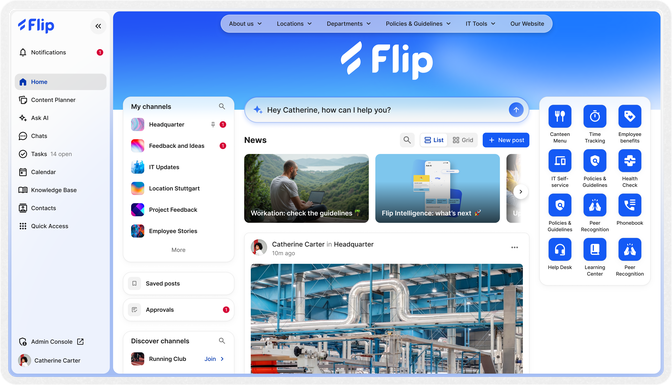
Visual example: Flip AI's desktop version
At a glance: the 12 best intranet platforms of 2026
| Platform | Best for | Mobile and frontline | AI and automation | Rating (G2 / Capterra) | Pricing |
|---|---|---|---|---|---|
| Flip AI | Mixed desk and deskless workforces | Native, offline-ready | Generative and agentic (Flip Intelligence) | 4.8 / 4.6 | Modular, custom |
| Microsoft SharePoint and Viva | Fully desk-based, Microsoft-first orgs | Limited on mobile | Copilot add-on | 4.2 (Viva) | From around £9.90 per user plus Viva |
| Staffbase | Top-down corporate communications | Limited frontline depth | Content-focused | 4.7 | Custom |
| Blink | Lightweight comms and community | Mobile-first | Summarisation | 4.7 | From $3.75 per user (Core) |
| Workvivo | Social and community feed | Built for desktop | Content-focused | 4.7 | From roughly $20,000 per year |
| Beekeeper | Frontline comms and basic ops | Good | Content and moderation | 4.6 | Custom |
| Haiilo | Simple social intranet, lower budgets | Not mobile-first | AI search | 4.3 | Custom |
| Speakap | Frontline and back-office comms | Limited offline | None native | 4.4 | Custom |
| Unily | Configurable enterprise intranet | Clean UX | Content creation | 4.6 | Custom (premium) |
| Simpplr | AI-led enterprise experience | Good | AI personalization | 4.6 / 4.8 | Custom |
| LumApps | Google Workspace and Microsoft 365 orgs | Good | AI content | 4.4 / 4.1 | Custom |
| Happeo | Google Workspace-first orgs | Good | AI search | 4.5 / 4.6 | Custom |
This comparison starts with the platforms most organizations already run, then works through the specialist alternatives. There is no single best fit for everyone. The right intranet software depends on your workforce, and the use-case guide above shows which platform suits which scenario.
How modern intranet platforms power internal communications
At its core, an employee intranet is a private, secure network through which a business distributes company communications. It creates a centralized space where employees access company news, find policies and forms, and stay connected to the wider organization.
What people expect from that space, however, has changed completely. Older platforms were clunky, static websites built to push top-down updates at a largely office-based audience. Distributed teams, digital-first norms, and the growing need to reach frontline workers have since reshaped the category. Today's intranet platforms strengthen company culture, streamline workflows, and lift employee engagement across the entire workforce.
Modern solutions describe themselves in many ways. You will see the terms internal communications software, digital workplace platform, social intranet software, and employee experience platform used almost interchangeably. Underneath the labels, they share a common ambition, which is to help businesses communicate clearly, share knowledge efficiently, and connect people to the systems they use every day.
A few related terms are also worth clarifying. An intranet packaged solution is a ready-made product chosen in preference to building a custom intranet from scratch. A cloud intranet runs on infrastructure such as Microsoft Azure or Amazon Web Services, and this is now the standard. An enterprise intranet is built for large, global organizations, handling high content loads, serving multiple business units, and meeting stringent security standards. Most of the platforms below qualify as enterprise intranet solutions.

Reach your operational teams 80% faster and more reliably
Flip AI's mobile app combines messaging, chat, HR tools, and your knowledge base in one secure application. No additional tools or licenses required.

Intranet software versus employee experience platform: what changed
The phrase employee experience platform appears throughout this guide, so it helps to define it against a traditional intranet. A traditional intranet distributes news and documents in one direction, from the organization down to its people. An employee experience platform goes further, adding two-way and peer-to-peer communication, HR self-service, task management, workflow automation, and increasingly a layer of AI that helps employees find answers and complete work.
The shift matters, since it connects communication to the tasks employees actually complete, and it does so wherever they work, including on a mobile app in a warehouse, a shop floor, or a delivery van.
Adoption is where many intranet deployments come undone. Platforms designed around corporate email and office directories assume that employees already live inside the company's digital systems, and frontline workers frequently do not. When a platform optimizes for desk-based knowledge workers, it leaves a large part of the workforce unreached, and the value of the whole system falls with it. The most capable intranet platforms of 2026 treat mobile access and one-touch onboarding as first principles rather than afterthoughts.

The key features of the right intranet software
Not every feature belongs in every solution, and the right intranet software for you will depend on the problems you are trying to solve. That said, a consistent set of capabilities separates the strongest platforms from the rest.
Strong internal communication features sit at the heart of every intranet, supporting top-down, bottom-up, and peer-to-peer communication through newsfeeds, channels, instant messaging, group chats, and feedback tools. Employee participation and social features such as surveys, digital suggestion boxes, employee directories, reactions, and recognition build the engagement that communication alone cannot. Knowledge management and knowledge sharing tools, backed by intelligent search functionality and solid document management, cut the time people waste hunting for information.
Improving communication and workflows
Integration capabilities determine how well the intranet fits your existing tools. Most providers connect to systems such as Microsoft 365, Microsoft Teams, Google Workspace, and HR platforms, yet the depth and reliability of those connectors vary widely, so buyers should look closely. Task management and dedicated collaboration spaces help teams turn communication into action, while analytics and reporting tools track adoption, engagement, and communication effectiveness, which matters for demonstrating intranet ROI.
An intuitive interface and genuine mobile access now matter more than ever. Many providers advertise a mobile app, yet a large number offer only a mobile-optimized version of a desktop product, and these feel cumbersome the moment a screen shrinks. The best solutions deliver device-native experiences on desktop and mobile. For frontline workers, a fast, mobile-first app that loads on patchy in-store or on-site connectivity makes the difference between a tool people use and one they ignore.
Finally, AI and automation have moved from novelty to expectation. Quality varies enormously, from a simple button that summarizes a long post to AI built into the architecture of the platform, answering questions and guiding people through workflows. AI effectiveness depends on participation, so a brilliant assistant delivers little value if half the workforce never opens the app. Governance matters too, since reliable AI answers rest on content ownership, approvals, version control, and certifications such as ISO 27001.
Which intranet software is best for your use case?
Finding the best company intranet software is less about a universal checklist and more about fit. Your needs will depend on your size, industry, and location, on the balance of desk-based and frontline staff in your workforce, on your existing tech stack and IT resource, and on your budget and timeline. With those factors in mind, the shortlist below maps common scenarios to the platforms that serve them best:
Mixed workforces with both desk-based and frontline workers: Flip AI, which gives desk staff an AI-first intranet and reaches frontline teams without a corporate email address.
Companies whose workforce is almost entirely desk-based and deeply committed to Microsoft: SharePoint and Viva.
Google Workspace environments: LumApps and Happeo.
Top-down employee communications: Staffbase.
Simple, user-friendly social intranets: Blink and Haiilo.
Consumer-style community feeds: Workvivo.
Highly configurable enterprise intranet deployments: Unily and Simpplr.
None of these choices is absolute, and many organizations run more than one tool. The detailed comparisons that follow will help you weigh the trade-offs.
The best mobile-first intranet platform for frontline workers and your entire workforce
Most intranet platforms were designed for people who already sit inside the company's digital systems, and that assumption breaks down for everyone else. Retailers, manufacturers, logistics operators, and care providers employ large numbers of people who never touch a work laptop or a corporate inbox, and reaching them is a common reason organizations replace a legacy intranet. In practice, though, most companies are neither entirely deskless nor entirely desk-based. They run a roughly even mix of the two, and they need an intranet that serves both groups equally well.
The strongest platform for a mixed workforce delivers three things at once: a modern, AI-first intranet for desk workers, a mobile-native experience with one-touch onboarding and offline access for frontline teams, and deep integration with tools such as SharePoint and Teams so that existing content becomes available to everyone, including on a phone. When a platform strikes that balance, adoption follows across the whole organization, and the value of every other feature rises with it.
The 12 best intranet software platforms of 2026, compared
Here is a detailed review of each platform, covering who it suits best, its strengths and weaknesses, and how it compares with Flip AI.
Flip AI
Flip AI is an AI-native employee experience platform designed for large organisations that employ both desk-based and frontline staff. It is especially popular among retailers and manufacturers, with customers including Bosch, Porsche, McDonald's, the REWE Group, and Rossmann. The platform brings together an AI-first intranet, internal communications, employee self-service, and workflow automation in a single app, with native experiences on desktop and mobile. It also integrates closely with SharePoint, Teams, and the wider Microsoft 365 world, so desk workers keep the tools they already know while frontline staff finally gain mobile access to the same content. At its core sits Flip Intelligence, a built-in AI suite that answers employee questions, surfaces knowledge from sources as varied as lengthy PDFs and third-party tools such as SharePoint, and automates common processes including onboarding, shift planning, and issue reporting.
Best for: Large and enterprise businesses with a mix of desk-based and frontline staff that want one platform to serve everyone. Flip AI gives desk workers a modern, AI-first intranet and gives frontline teams the mobile access they have long lacked, while strengthening internal communications and streamlining HR and operational workflows. It is a particularly strong fit for organisations already invested in Microsoft SharePoint and Teams that want to extend that content to their whole workforce, including the deskless staff Microsoft alone struggles to reach.
Strengths:
High adoption, even among hard-to-reach frontline workers, thanks to a social-media feel, one-click download, and native apps that give employees direct access to chats, tasks, time off, and payslips.
Powerful communication and community tools, including a news feed, channels, live streaming, and voice and video calling, plus digital signage that pushes news to screens in factories and break rooms.
Flip Intelligence, the built-in generative and agentic AI, learns from intranet content and documents, then answers questions and guides employees through automated processes.
A modern, AI-first intranet for desk-based staff, with one-click SharePoint News and Knowledge syncing and an Azure OpenAI connector that make existing SharePoint and Teams content available to frontline teams on mobile.
Plug-and-play integrations with HR systems such as SAP SuccessFactors, Workday, and UKG, without lengthy integration projects.
Full GDPR compliance, secure hosting on Azure, single sign-on, and SOC 2 and ISO 27001 certification.
Weaknesses:
Capabilities are tuned to large enterprises with frontline teams, so smaller or purely desk-based businesses may find a better-matched feature set elsewhere.
Flip AI is configurable rather than fully customisable, which speeds deployment yet will not suit organisations wanting a bespoke build with custom code.
Task management was built for frontline operations and will not replace a dedicated project management tool.
What customers say: Reviewers highlight how the app reaches employees who have no PC at work, and praise the intuitive channels and direct messaging alongside customer support that resolves issues quickly. Flip AI holds a Capterra average of 4.6 and a G2 average of 4.8.
Pricing: Flip AI scales from regional pilots to global rollouts. The core platform covers essentials such as news, communication, and task management, while modular products add Mini Apps, workflow automation through Flows, and an enterprise AI platform. Pricing depends on organisation size, use cases, and product mix, so it is best to request a tailored estimate.
Microsoft SharePoint and the Viva suite
Microsoft SharePoint is a web-based platform for team collaboration and document management, and it frequently forms the foundation of a Microsoft-based intranet thanks to its compatibility with Outlook, Teams, and Microsoft 365. The Viva suite is Microsoft's employee experience layer, adding Viva Engage for social networking, Viva Connections for a personalised dashboard, Viva Amplify for campaigns, and Viva Learning for training content.
Best for: Organisations whose workforce is almost entirely desk-based and already standardised on Microsoft Teams, with the IT resource to configure and maintain the stack. As soon as a meaningful share of the workforce is deskless, the fit weakens sharply.
Strengths: SharePoint is a flexible foundation for knowledge workers and is strongly favoured by IT teams already invested in Microsoft 365, with well-trusted enterprise-grade security.
Weaknesses: Setup and maintenance are complex and demand significant IT time. The full functionality found in other modern intranet software often arrives only through several Viva modules at extra cost. The mobile experience is slow, offline support is absent, and there is no out-of-the-box functionality for common frontline tasks, so for the many organisations that run a roughly even split of desk and deskless staff, half the workforce is left effectively unserved. Entra ID provisioning and individual licences are required for every user, which leads many organisations to skip frontline workers on cost grounds. Viva Engage holds a Capterra score of around 4.2.
Pricing: Priced per user per month on an annual commitment. Microsoft 365 Business Standard, which includes SharePoint, sits at around £9.90 following a UK price rise in July 2026, Entra ID packages range from £4.60 to £9.20, and Viva adds from £1.54 to £9.20 per user per month.
Flip AI versus SharePoint and Viva: SharePoint and Viva work well as a standalone intranet when your workforce sits almost entirely at a desk. Most organisations are more mixed than that, and this is where Flip AI and Microsoft are stronger together than apart. Flip AI keeps the Microsoft investment your desk workers rely on and extends it to everyone, surfacing SharePoint news and knowledge inside a mobile-native app that frontline teams actually open, and adding HR self-service, workflow automation, and agentic AI on top. Around 95 percent of Flip AI customers run Flip AI alongside Microsoft, integrating Teams, SharePoint, and Azure OpenAI securely, so the decision is rarely Flip AI or Microsoft and far more often Flip AI with Microsoft.
Staffbase
Staffbase is an employee communication platform built to connect large, distributed organisations through a central communication hub, offering a modern intranet with robust corporate communication tools and strong integrations. It suits corporate communications teams focused on top-down comms. Its strengths include a strong feature set for internal comms teams, built-in reporting, the option of a fully branded native app, and integration with SAP and Office 365. On the other hand, it focuses on top-down communication with few social engagement features, offers limited out-of-the-box functionality for frontline or mobile workers, restricts content governance without add-ons, and supports task and knowledge management weakly, all at a comparatively high price. One reviewer calls it comprehensive yet relatively complicated to deploy. Staffbase holds a Capterra score of around 4.7, and its pricing is not publicly available.
Flip AI versus Staffbase: Staffbase works well for internal comms teams publishing updates and reinforcing brand messaging. Flip AI covers that ground and adds HR self-service and workflow automation in a single, mobile-native app that supports every employee, including those without a desk, with out-of-the-box HR and operations integrations, faster deployment, and simpler administration.
Blink
Blink is a mobile-first modern intranet offering a streamlined, user-friendly experience with a strong emphasis on community and engagement. It suits businesses that want a lightweight platform to build community through better communication and place less priority on operational depth. Its strengths include a rich newsfeed that acts as a single source of truth, strong chat, a distinctive Stories format, and AI tools focused on summarising posts. Its weaknesses include few operational tools with no native task management or automation, an AI assistant limited to summarisation and post creation, page building that lacks flexibility, and some integrations to SharePoint or HCM tools that fall short. Reviewers praise it as a simple, fast way to share company-wide information. Blink holds a Capterra score of around 4.7. Its Core plan starts at $3.75 per user per month billed annually, and its Pro plan at $5.00 per user per month, with higher tiers adding single sign-on, API access, and custom branding.
Flip AI versus Blink: Blink is clean and simple, and that simplicity limits its operational depth. Flip AI offers the same modern experience and adds generative and agentic AI, workflow automation, native task management, and deep integrations for content management and employee self-service.
Workvivo
Workvivo is Zoom's employee communications and community platform, providing social intranet functionality with a consumer-style feed and community spaces. It suits communications teams that want a familiar, social feel and do not require task management or robust operational tools. Its strengths include excellent tools for office workers, easy migration for former Workplace users, strong translation, and supportive customer support. Its weaknesses include a desktop-first design with less depth for frontline workers, limited HR integrations, some features that still lack maturity, and a risk of information overload. Historic questions around Zoom's security claims and its use of customer data to train AI may also raise compliance considerations. Reviewers value how it keeps them up to date while noting content can feel cluttered. Workvivo holds a Capterra score of around 4.7. A Business plan for 250 to 2,000 employees carries a typical minimum around $20,000, alongside a custom Enterprise plan.
Flip AI versus Workvivo: Workvivo offers a strong social feed for desktop users. Flip AI combines communication with HR tools, automation, and intelligent workflows in a mobile-native experience built for the flow of frontline work, with real-time knowledge access, offline functionality, and European privacy standards.
Beekeeper
Beekeeper describes itself as an employee app made for the frontline workforce, combining modern communication channels with engagement tools and some HR functionality. It suits frontline-heavy workforces that want communication and engagement alongside some operational features. Its strengths include a well-considered onboarding experience, an easy start for end users, employee recognition through shout-outs, and Microsoft 365 and SAP compatibility. Its weaknesses include a user experience that trails several competitors, lightweight content management and shift scheduling given the price, AI tools focused mainly on content, and an Ask HR bot that relies on a manual FAQ database. Features such as attribute-based user management, single sign-on, and API access sit only in the top-tier package. A reviewer calls it clear and intuitive yet relatively expensive. Beekeeper holds a Capterra score of around 4.6, with three unpriced packages.
Flip AI versus Beekeeper: Beekeeper fits frontline workforces with basic communication needs. Flip AI pairs ease of use with deeper functionality across HR, operations, and internal comms, including native automation and intelligent knowledge surfacing, delivering more out of the box with less setup effort.
Haiilo
Haiilo is a simple, intuitive social intranet built to boost employee inclusion and participation, made up mainly of communication and collaboration tools. It suits businesses that want a straightforward platform to increase participation. Its strengths include a simple design suited to administrators and end users, excellent social engagement tools, a low base price, strong customer support, and AI-powered search functionality. Its weaknesses include a heavy communication focus with few operational tools, a mobile experience that lags competitors since Haiilo is mobile-friendly rather than mobile-first, few out-of-the-box integrations, and AI that remains poorly integrated beyond search. A reviewer likes how easily it shares updates while noting the interface can feel cluttered. Haiilo holds a Capterra score of around 4.3, with three unpriced modules named Engage, Align, and Measure.
Flip AI versus Haiilo: Haiilo is lightweight and focuses on social engagement rather than operational impact. Flip AI delivers both, offering an intuitive, mobile-native platform with engagement and automation tools that simplify processes such as onboarding and time-off requests, and it integrates readily with existing systems without costly custom work.
Speakap
Speakap is a communication and engagement platform aimed at both back-office and frontline teams, enabling internal communication, community building, and collaboration through news, surveys, and document sharing. It suits businesses that want to combine social intranet features with some operational tools. Its strengths include ease of use across frontline and back-office staff, strong top-down and bottom-up communication, a Journeys feature with particular value in onboarding and training, and strong customer support. Its weaknesses include peer-to-peer chat that lacks maturity with reported performance issues, limited offline functionality, an Android version that still lacks features, and no native AI tools. A reviewer praises the simple design while explaining that their organisation is moving on as it needs more extensive options. Speakap holds a Capterra score of around 4.4, with three unpriced packages.
Flip AI versus Speakap: Speakap offers a social feed and surveys yet struggles with performance, especially on Android, and lacks modern AI. Flip AI was purpose-built for frontline teams, pairing an intuitive experience with communication, knowledge, workflow automation, and AI in a single, reliable platform.
Unily: the configurable enterprise intranet
Unily is a highly configurable employee experience platform built for large organisations, offering internal communications, collaboration, and community-building features. It suits large businesses that want a broad array of features with fine-grained, manual control. Its strengths include a clean, attractive experience, strong content management, AI-supported content tools, personalised user Journeys, and powerful search. Its weaknesses include being the most expensive option in most cases, integrations that generally require IT resource, a complex back-end, customer support that reviewers sometimes find slow, and AI limited to content creation, with no employee AI chatbot at present. A reviewer values the flexibility while noting slow support tickets. Unily holds a Capterra average of 4.6, with custom pricing across four core modules and three add-ons.
Flip AI versus Unily: Unily excels in content management and can be tailored in detail, provided you have the budget, time, and IT resource to match, and for many organisations that complexity becomes a barrier. Flip AI is built for fast rollout, high adoption, and operational impact, with built-in AI that helps employees find answers and complete processes without custom builds.
Simpplr
Simpplr is an AI-led employee experience platform aimed at medium and large enterprises, positioned around an intelligent, personalised intranet that tailors content and surfaces relevant information for each employee. It suits enterprises that want an AI-first, well-designed intranet with strong personalisation for a desk-based or hybrid workforce. Its strengths include a clean, modern interface, AI-powered personalisation that adapts content delivery to behaviour, strong analytics, and recognition from industry analysts, which buyers should confirm against the latest published reports. Its weaknesses include a primary orientation towards knowledge workers with less depth for frontline use cases, fewer native tools for HR and operational automation, and pricing available only on request. Reviews are generally positive on design and personalisation, and Simpplr holds a G2 average of around 4.6 and a Capterra average of around 4.8.
Flip AI versus Simpplr: Simpplr brings strong AI personalisation to a polished, desk-oriented intranet. Flip AI applies AI to a different problem, using Flip Intelligence to help frontline workers complete tasks rather than only personalise the content they read, with a mobile-first foundation a desk-first platform struggles to match.
LumApps
LumApps is an employee experience platform known for deep integration with productivity suites, working with both Google Workspace and Microsoft 365. It suits organisations that want their intranet to sit closely alongside the collaboration tools employees already use. Its strengths include strong integration with Google Workspace and Microsoft 365, a modern content management experience, personalised content delivery, AI-supported content tools, and a track record with large, international organisations. Its weaknesses include complexity that can require meaningful configuration and IT involvement, a focus on communication and content rather than deep frontline workflows, and pricing available only on request. LumApps holds a G2 average of around 4.4 and a Capterra average of around 4.1.
Flip AI versus LumApps: LumApps is a natural fit for content-led intranets anchored in Google Workspace or Microsoft 365. Flip AI is built for organisations whose priority is reaching and enabling frontline workers, with a mobile-native app, one-touch access, and automation for HR and operations that extends the intranet to people a productivity suite rarely reaches.
Happeo
Happeo is a social intranet built around Google Workspace, designed to combine communication, collaboration, and knowledge management for organisations that live inside Google's ecosystem. It suits Google Workspace-first organisations that want a straightforward, well-integrated social intranet. Its strengths include seamless Google Workspace integration, a tidy structure for pages and channels that supports knowledge sharing, AI-powered search, and an approachable interface. Its weaknesses include a close tie to Google Workspace that appeals less to Microsoft-first organisations, limited depth for frontline, HR, and operational use cases, and pricing that is not publicly listed. Reviewers appreciate the integration and clean design, and Happeo holds a G2 average of around 4.5 and a Capterra average of around 4.6.
Flip AI versus Happeo: Happeo serves Google Workspace organisations well as a communication and knowledge hub. Flip AI addresses a broader challenge, connecting an entire workforce that includes people without a desk or a corporate account, and adding workflow automation and agentic AI on top of communication.
A note on Workplace from Meta
Workplace from Meta was an enterprise social network that combined chat, video, groups, and a social intranet. Meta discontinued the product in early 2025, so it no longer belongs on a shortlist. Organisations that valued its simplicity and social feel often look for a platform that keeps that ease of use while adding enterprise security, offline access, intelligent workflows, and HR integration, and Flip AI is a common destination for former Workplace customers for exactly these reasons.
How to choose the right intranet software
Choosing the right intranet software becomes far easier once you approach it as a structured decision rather than a feature comparison. Start by defining the problems you want to solve and the outcomes you expect, whether that is faster information access, higher engagement, or fewer manual processes.
What to evaluate: workforce fit, features, adoption, and customer support
First, assess your workforce and work out the balance between desk-based knowledge workers and frontline staff, since this single factor rules several platforms in or out.
Second, define the key features you genuinely need, separating essentials from nice-to-haves so you do not pay for capability you will never use.
Third, look hard at adoption evidence, since peer review sites such as G2 and Capterra, alongside independent analyst evaluations, reveal how well a platform performs with organizations similar to yours. Fourth, weigh the full picture of cost and effort, including implementation, integration needs, customer support, ongoing support, and total cost of ownership over several years rather than the headline license fee. A short pilot with a representative group of employees, especially frontline workers, will tell you more than any demo, and it is far cheaper to learn that lesson during a pilot than after a full rollout.
Closing thoughts: a new intranet for a new age
Modern intranet software has become essential for businesses that want to build engagement, enable effective internal communications, and streamline everyday operations. With so many workers still lacking the tools they need to succeed, choosing the right platform matters more than ever. Begin by pinning down the problems you want to solve and the functionality you need, then review each vendor carefully against your workforce, your ecosystem, and your appetite for configuration.
For organizations with frontline teams in particular, prioritize reach and adoption above all, since a platform that everyone uses will always outperform a richer one that half the workforce never opens. Do that, and you will land on the intranet software that genuinely fits your organization in 2026 and for years to come.
FAQ - Best intranet software
Yes. Microsoft offers SharePoint for intranet sites and document management, extended by the Viva suite, which includes Viva Connections, Viva Engage, Viva Amplify, and Viva Learning, for employee experience features. The combination suits Microsoft-first, desk-based organizations, though it offers limited functionality for frontline workers and requires considerable IT resource to configure and maintain.
For companies that need to reach frontline and deskless workers alongside their desk-based staff, Flip AI is the leading SharePoint alternative, and in practice it more often complements SharePoint than replaces it. It is a mobile-native platform that works without a corporate email address and makes your existing SharePoint and Teams content available to everyone, while syncing securely with Azure OpenAI. For desk-based social intranets, Staffbase, Workvivo, LumApps, and Unily are common alternatives, with the right choice depending on your ecosystem and priorities.
Yes. SharePoint is widely used as the foundation of a Microsoft-based intranet. It requires significant IT resource to configure and maintain, and its mobile experience is limited, so many organizations pair it with, or replace it with, a mobile-first platform in order to reach frontline staff.
A traditional intranet distributes company news and documents in one direction. An employee experience platform adds two-way and peer-to-peer communication, HR self-service, task management, workflow automation, and AI, connecting communication to the tasks employees actually complete, including on mobile.
Flip AI is purpose-built for frontline and deskless teams. It offers a mobile-native, offline-ready app, one-click access without a corporate email address, and built-in AI that guides employees through onboarding, shift and time-off requests, and issue reporting, all within a single app.
Pricing varies widely. Entry-level platforms such as Blink start at around $3.75 per user per month, Microsoft 365 with SharePoint sits at around £9.90 per user per month before Viva add-ons, and enterprise platforms including Workvivo and Unily use custom pricing that often starts in the tens of thousands per year. Total cost of ownership should also account for implementation, integration, and ongoing support.

Dr. Nirmalarajah Asokan
Dr. Nirmalarajah Asokan is Senior Content Marketing Manager at Flip AI and writes about topics such as HR digitalization, employee apps, internal communications, and AI transformation. With an academic background and many years of experience in content marketing and SEO, he specializes in practical, data-driven content on employee experience, change management, and digital collaboration for modern organizations.
Don’t forget to share this content

More on the topic of Intranet

Intranet vs digital workplace: What’s the difference?

Intranet Software & Platforms: What to Look for in 2025

7 tips to create a successful social intranet